
THE ELECTRICAL PROJECT WORKSPACE

Electrical design.
All together.

Your calculations, project records and reports.
Connected from the first input to the next revision.

✓ Public calculators. Free one-user workspace during Beta 1.

Everything has a place.CBL-101 · Workshop submain
/ WORKSPACE•••
PRJ–0012

Workshop upgrade

Your design, taking shape.
CalculationsDocumentsActivity+
Cable sizingCBL-101 · Rev C
Draft
Voltage dropCBL-101 · Rev B
Issued
Maximum demandMSB-01 · Rev A
Draft
Ampacities
TECHNICAL REPORT

Voltage drop

Workshop upgrade

CALC–002REV B
Illustrative document
A clear revision trail.Earlier records stay on file.
ILLUSTRATIVE WORKSPACE
01

Calculate. Work through the detail.

02

Organise. Keep it with the project.

03

Report. Leave a clear record.

A HOME FOR YOUR ENGINEERING

One project.
Every detail connected.

Bring the work together. Find a calculation by its equipment tag, follow a revision, or open the report—all in context.

Click to explore the example
ampacities / projects / workshop-upgradeDEMO
Projects / Workshop upgrade

PRJ–0012 · EXAMPLE PROJECT

Workshop upgrade

Select a calculation to see its document and revision history.Synthetic example data

LESS SEARCHING. MORE ENGINEERING.

The detail changes.
The context stays.

From the circuit tag to the latest report,
keep the thread of your design intact.

01 / EQUIPMENT TAG

CBL-101

Workshop submain

02 / CALCULATION DOCUMENT

One project record.

Inputs · results · revisions

Linked to Workshop upgrade
03 / REVISION HISTORY
A→B→C

Nothing gets lost.

Earlier issued records retained.

PROJECT → TAG → DOCUMENT → REVISION

YOUR EVERYDAY ENGINEERING TOOLS

Start with
the right calculation.

Focused tools for electrical design.
Inputs, results, method references and limits.

View all calculators

Method references and limits are included. Engineering review remains required.

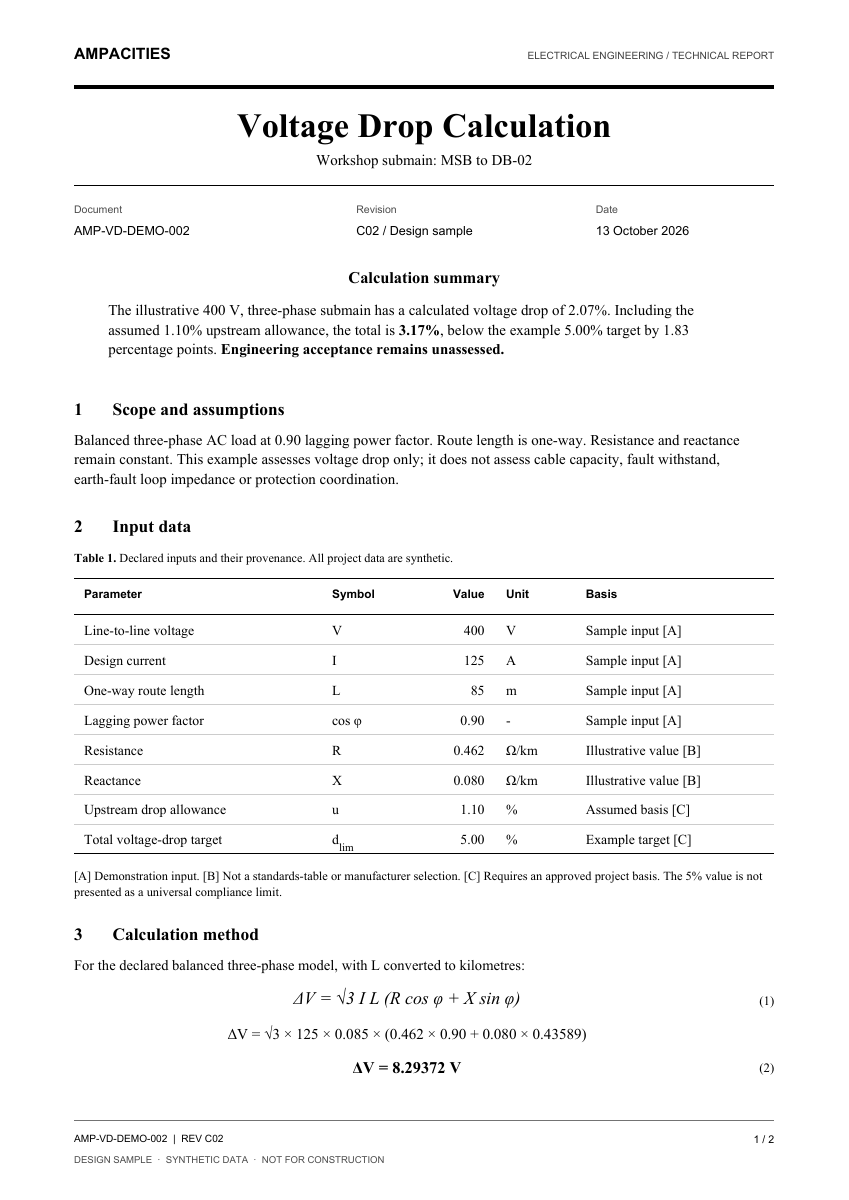
Ampacities voltage drop report with inputs, method and document control
The details. On record.Inputs · results · references · revision
A4 / TECHNICAL REPORT

WORK THAT LEAVES A CLEAR RECORD

From calculation
to conversation.

A useful report does more than show a number. It keeps the inputs, method and revision details together, ready for the next person to review.

  • Inputs and assumptions in plain view
  • Method references beside the results
  • Document numbers and revision details
View a sample report

Design sample · Synthetic data.
Engineering acceptance remains unassessed.

COMING SOON THE NEXT CHAPTER

Good engineering.
A well-run practice.

Clients, deliverables, time and billing.
Planned tools to connect the rest of your working day.

PRACTICE WORKSPACECONCEPT PREVIEW

Planned features · Illustrative screens · Synthetic data

First: project workspace and draft time entry. Timers, approvals, expenses, billing and reporting follow in later stages.

ROOM TO GROW

Your work.
Your kind of plan.

Start with a calculation. Build a project workspace.
Bring the team together when you’re ready.

THE ESSENTIALS

Free

For a quick calculation and a clear answer.

$0Public calculator access
  • Use the public calculator library
  • Review inputs and results
  • Read method references and limits
  • No account needed to calculate
Explore free calculators

Saving calculations and creating reports requires an account.

FOR ENGINEERING BUSINESSES

Teams

A shared workspace that fits your practice.

Pricing to be announcedPlanned business plans

A small team, with shared projects and clear roles.

  • Pro workspace capabilities
  • Shared projects and member roles
  • Access sized to your business

Member bands are proposed. Pricing and final inclusions will be confirmed before launch.

During Beta 1 · The existing one-user workspace is free. Pro and Teams describe the proposed plan structure; no purchase or subscription starts here.

A FEW THINGS TO KNOW

Clear from
the start.

Can I use the calculators without an account?+

Yes. The public calculators can be used without signing in. An account lets you save work and create supported reports.

How do tags and revisions fit together?+

A tag identifies a circuit or item of equipment. Each calculation has its own document number and revision history, all kept within the project.

Does a saved result mean the design is approved?+

No. Check each calculator’s scope, inputs and method limits. Engineering review and the applicable issue requirements remain part of your work.

Is practice management available now?+

The new practice management suite is planned. Project workspace and draft time entry come first. Timers, approvals, expenses, billing and reporting follow in later stages. The screens here are illustrative previews.

When will Pro and Teams pricing be available?+

Pricing is to be announced. Pro is planned for individuals, with Teams options based on member count. Final inclusions and member bands will be confirmed before launch. The existing one-user workspace remains free during Beta 1.

What does Beta 1 include?+

The existing site describes a free one-user workspace during Beta 1 for projects, saved calculations, revisions and supported reports. Team access is by enquiry. Pro and Teams pricing will be announced before launch.

BUILT AROUND THE WAY YOU WORK

Make room for
better engineering.

Take a closer look